
Fast File Transfer2.1.5 - Get APK
You'll be able to download in few seconds.
Publisher Description

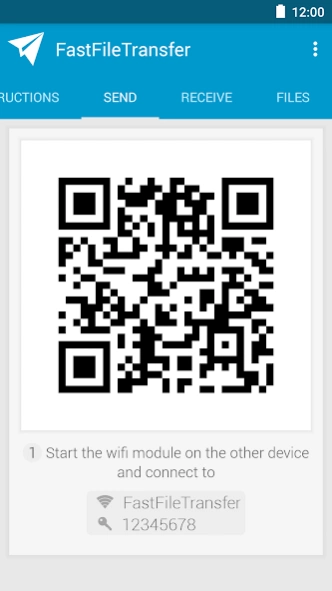

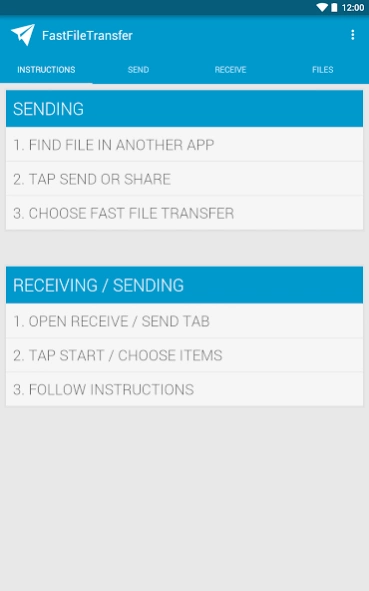
Fast, offline file exchange between literally any platforms.
"A new era of file sharing"- appszoom.com
"The beauty of this utility is its simplicity"
- redmondpie.com
FastFileTransfer has a simple mission: Offering fast, offline file exchange between literally any platforms.
In a world of dozens of different operating systems, with many different file transfer standards and protocols, it's still difficult to transfer files between them. With FastFileTransfer, you have a flexible solution for any data exchange need.
Features
:
• Lightning fast: Transfer 1 GB in under 4 minutes
• Send multiple files or even whole folders (as ZIP)
• Easy to follow step-by-step instructions
• Receive from any device and operating system that supports WiFi
• No need for an existing WiFi connection
• Works completely offline
• The receiver does not have to have the app installed
• Send multiple files as ZIP
• Display QR codes for faster receiving
• Optionally use NFC for pairing
• Unique engine specifically developed for compatibility against a wide range of Android devices
• Send to an unlimited number of devices at the same time
Buy the Pro Version to
:
• Let FastFileTransfer do all the receiving setup via the built-in QR scanner
• Receive files from devices that don't have FFT installed
• Let receivers download multiple files with one click (unzipped)
• Get rid of the ads
Using this app, you can easily send a file to an
iPhone
or any other phone that does not have Bluetooth but Wi-Fi.
Will Kelly from Techrepublic wrote a tutorial on how to send files from Android to iOS using Fast File Transfer: http://www.techrepublic.com/blog/smartphones/send-files-between-android-and-ios-with-fast-file-transfer/6097
How to send multiple files?
Just select multiple files in your file explorer and tap "Send via" (or similar) -> "Fast File Transfer"
In some file explorers first tap "Send via" in the menu, choose this app and then your files.
I don't want to always enter the address on the receiver's phone!
Simply use the built-in QR codes or NFC support. PRO version even comes with a built-in QR reader.
The transfer speed this app offers depends on the sender and receiver device. For the best speed, use Wifi Direct or Wifi Tethering (and uncheck Wifi in the app's connectivity mode setting)
Although I have never experienced such a case, I do not guarantee for any data fees caused by this app.
About Fast File Transfer
The company that develops Fast File Transfer is Florian Draschbacher. The latest version released by its developer is 2.1.5.
To install Fast File Transfer on your Android device, just click the green Continue To App button above to start the installation process. The app is listed on our website since 2018-05-28 and was downloaded 0 times. We have already checked if the download link is safe, however for your own protection we recommend that you scan the downloaded app with your antivirus. Your antivirus may detect the Fast File Transfer as malware as malware if the download link to com.floriandraschbacher.fastfiletransfer is broken.
How to install Fast File Transfer on your Android device:
- Click on the Continue To App button on our website. This will redirect you to Google Play.
- Once the Fast File Transfer is shown in the Google Play listing of your Android device, you can start its download and installation. Tap on the Install button located below the search bar and to the right of the app icon.
- A pop-up window with the permissions required by Fast File Transfer will be shown. Click on Accept to continue the process.
- Fast File Transfer will be downloaded onto your device, displaying a progress. Once the download completes, the installation will start and you'll get a notification after the installation is finished.
Program Details
System requirements
Download information
Pricing
Version History
version 2.1.5
posted on 2018-05-28
2.1.5:
+ Fixed issue where license was not correctly recognised
2.1.4:
+ Fixed crash on Android 8.1
2.1.3:
+ Prepared for compliance with the GDPR
+ Minor improvements
version 2.1.2
posted on 2017-03-04
+ New data picker for easy picking of files, pictures, videos and apps
+ Support sending from external storage on 5.0 and newer
+ Added support for Android Nougat's multi window
+ Supports Android Nougat's global drag and drop
+ Dynamic port selection should fix issues with recent Samsung Galaxy devices
+ Material design web pages
+ Design revision
+ Bug fixes
+ Minor improvements
version 2.1.1
posted on 2016-05-09
+ Added Vietnamese translation,+ Bug fixes,+ Minor improvements
version 1.2.2
posted on 2013-05-15
Several fixes and updates
Disclaimer
External Download
We do not host Fast File Transfer on our servers. We did not scan it for viruses, adware, spyware or other type of malware. This app is hosted by Galad and passed their terms and conditions to be listed there. We recommend caution when installing it.
The APK Download link for Fast File Transfer is provided to you by apps112.com without any warranties, representations or guarantees of any kind, so access it at your own risk.
If you have questions regarding this particular app contact the publisher directly. For questions about the functionalities of apps112.com contact us.
